
Matchmaking - Guide
Allow game makers to create multi-user experiences [SOCL-Matchmaking-02]
To create a Matchmaking experience with Beamable, using the SimGameType content type is required. It allows deep configuration and customization.
Steps
Follow these steps to get started:
| Step | Detail |
|---|---|
| • See Step 1 - Getting Started |
| • The content type related to Matchmaking is the Note: SeeSetup Content below for more info |
| • Access Local Player Information Note: SeeMultiplayer - Code for more info |
| • Convert input to events • Gracefully handle network latency • Convert events into graphics and audio rendering • Handle game logic (e.g. win/loss conditions) |
Setup Content
The content type related to Matchmaking is the SimGameType. It defines the parameters for the match to be created.
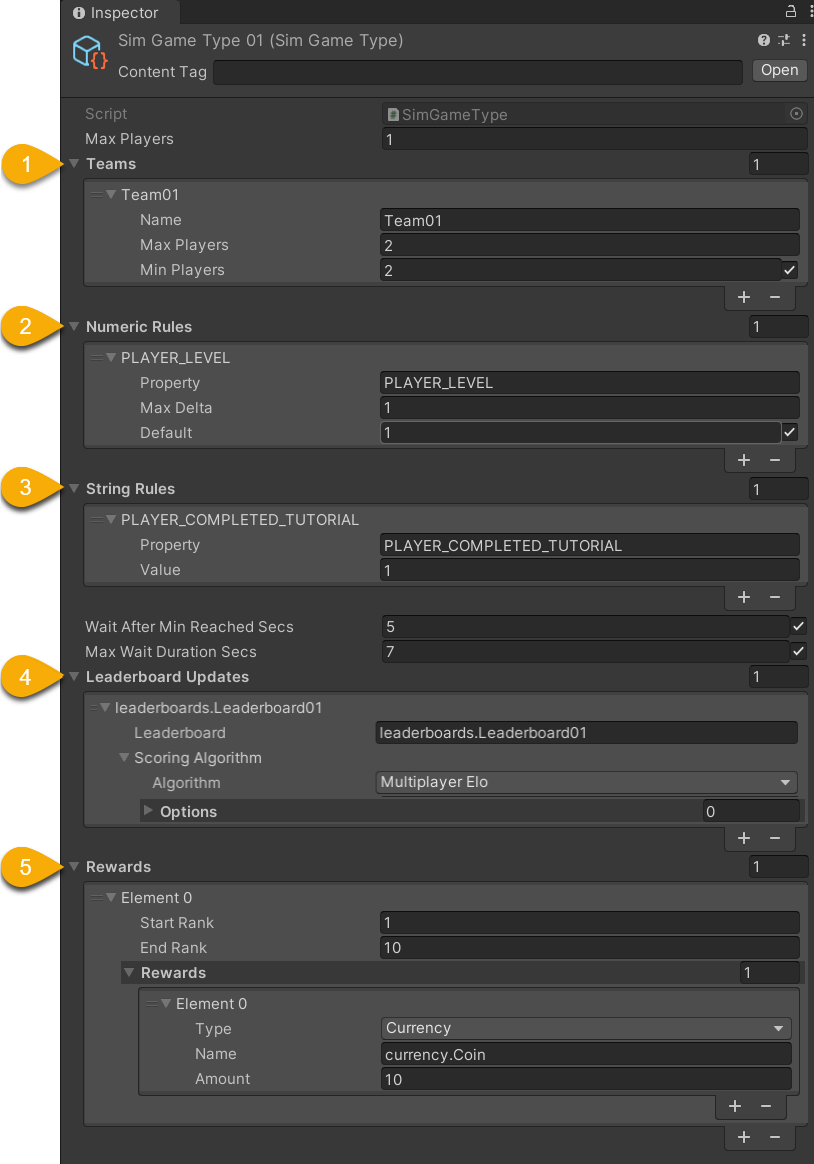
| Name | Detail |
|---|---|
| • Name - Arbitrary name • MaxPlayers - Maximum players allowed • MinPlayers - Minimum players allowed |
| Match to players who have an approximate • Property - The stat name |
| Match to players who have an exact • Property - The stat name |
| • Leaderboard - The reference to update • Scoring Algorithm - (Advanced use cases) |
| • Start Rank - The best rank to be rewarded • End Rank - The worst rank to be rewarded • Reward - The type and amount of the reward |
| Misc | • MaxPlayers - This is deprecated • WaitAfterMinReachedSecs - Duration to wait if match found (with just the minimum players) • MaxWaitDurationSecs - Duration to wait if no match found |
Updated 12 months ago